Auralo Drip Made by Auralo

A water buddy for your desk.

Most water apps live on your phone. Drip lives on your computer, where your workday happens, and reminds you to drink water and to get up from your desk. Then it gets out of your way.

Also for Windows and Linux.

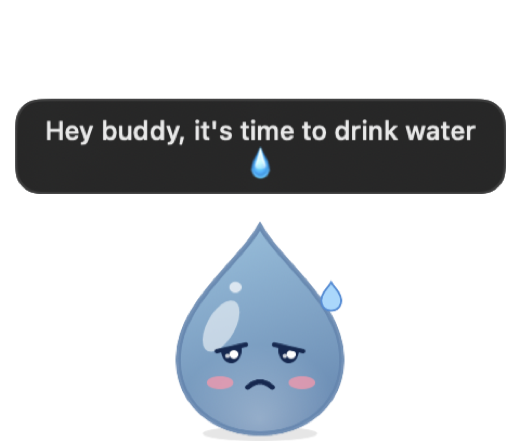
Hey buddy, it's time to drink water 💧

A workday with Drip

Your goal is spread evenly over the hours you work, so Drip knows when you've fallen behind. Here's how a day goes.

  1. 09:000 L so far
    Drip, smiling.

    Drip starts the day with you.

    It sits in your menu bar, and on your desktop if you like, showing today's water at a glance.

  2. 09:500.3 L so far
    Drip, arms raised in a stretch.

    Fifty minutes in the chair.

    Drip raises its arms. Stand up and stretch while it counts down a short break with you.

  3. 11:400.5 L so far
    Drip, droopy and sweating.

    A little behind on water.

    Drip slides in from the edge of your screen: “Hey buddy, it's time to drink water.”

  4. 11:410.5 L so far
    Drip, frowning, with an angry mark.

    Still nothing?

    Ignore it for a minute and Drip gets grumpy. It asks again later, not every minute.

  5. 11:420.75 L so far
    Drip, eyes closed, mid-gulp.

    Gulp gulp.

    Click Drip to log a glass, or hover over it to pick a size. It drinks along, then gets out of your way.

  6. 18:102.5 L, goal met
    Drip, beaming, wearing a small crown.

    Goal met.

    A burst of confetti, once. Reach your goal seven days in a row and Drip earns a crown.

Small, quiet, and yours

Drip on the desktop, droopy and sweating, saying: Hey buddy, it's time to drink water.
On your desktop
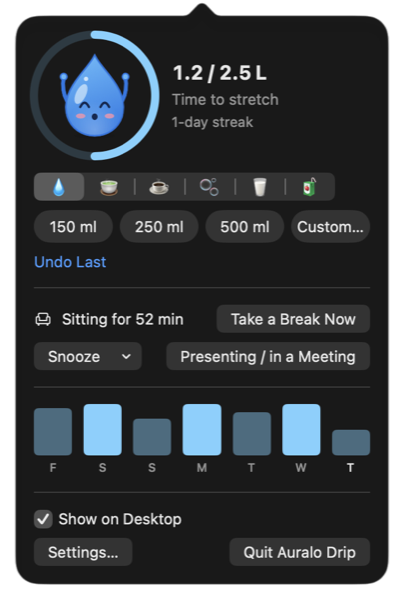
The menu bar window: Drip stretching inside a progress ring at 1.2 of 2.5 litres, drink buttons, glass sizes, a sitting timer and the last seven days.
In your menu bar
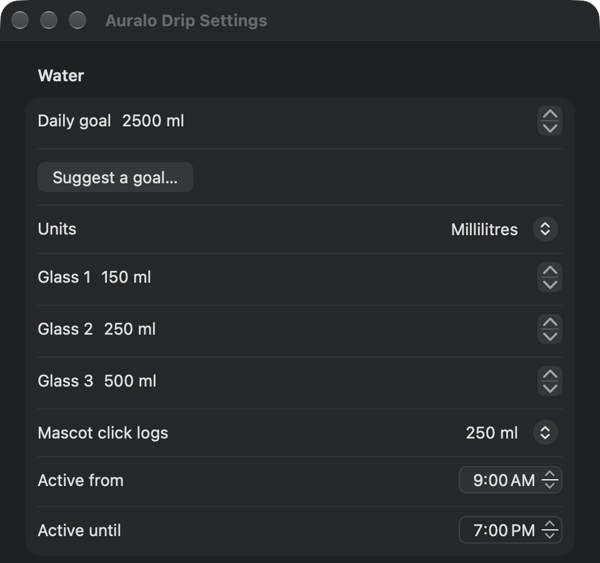
Settings: daily goal, Suggest a goal, units, glass sizes, active hours and break timing.
Settings, including Suggest a goal
Water, tea, coffee
Log what you actually drink from the menu bar. Every drink counts toward your goal, and the last seven days are a glance away.
Out all day, or only when needed
Keep Drip on your desktop, or let it appear 30 seconds before a reminder and leave once you've logged.
A widget with buttons
Log a glass or start a break from your desktop or Notification Center.
Quiet in meetings
Reminders pause while your Mac is locked, and one click mutes them for an hour.
Nothing leaves your computer
No account and no tracking. Your water log is stored on this computer only.
A goal that fits you
Get a suggested goal from your weight and your day, or set your own. Pick glass sizes, working hours, and how long you sit before a break.

Questions

Is Drip free?

Yes. The download on this page is free.

Does it need special permissions?

No. To know you've been sitting, Drip reads how long it's been since you last used the keyboard or mouse, the same number macOS uses for the screen saver. It never sees what you type. Notifications are optional.

Will it slow my computer down?

No. While it waits, Drip uses well under 1% of the CPU; it only animates when something happens.

Where is my data?

On your computer, and only there. There's no account, no tracking, and nothing is uploaded.

Does it work with Auralo on iPhone?

Not yet. Syncing your water with Auralo on iPhone is on our list.

Which computers does it run on?

Macs with macOS 14 Sonoma or later (Apple silicon or Intel), Windows 10 and 11, and most Linux desktops. On Linux with Wayland, Drip can't follow your cursor with its eyes, because Wayland keeps the cursor private.
The Drip app icon

Get Drip

Mac: version 1.3.2, 3.3 MB. Needs macOS 14 Sonoma or later. Signed and notarized by Apple.

Windows

Windows 10 and 11.

Get it from Microsoft Store

Or download directly: installer · MSI for managed installs

Linux

Ubuntu, Debian, Fedora, Arch and most desktops, on Intel/AMD or ARM.

Ubuntu / Debian (.deb)

Fedora / openSUSE (.rpm) · Flatpak · Arch (PKGBUILD) · AppImage · .tar.gz

ARM64: .deb · .rpm · AppImage · .tar.gz

The Microsoft Store version is signed by Microsoft and updates itself. The direct Windows installer isn't code-signed yet, so Windows may say it protected your PC: choose More info, then Run anyway. Checksums are on the release page.