Auralo Drip Made by Auralo

A water buddy for your desk.

Most water apps live on your phone. Drip lives on your computer, where your workday happens, and reminds you to drink water and to get up from your desk. Then it gets out of your way.

Also for Windows and Linux.

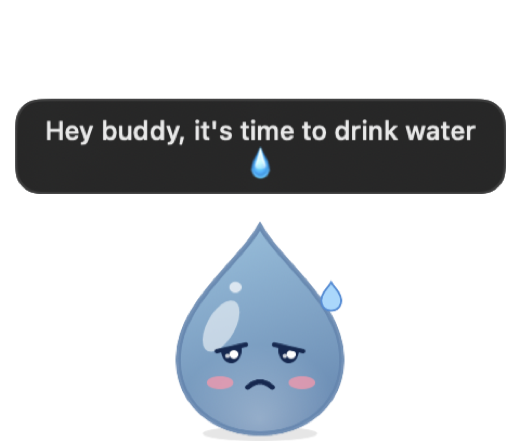
Hey buddy, it's time to drink water 💧

A workday with Drip

Your goal is spread evenly over the hours you work, so Drip knows when you've fallen behind. Here's how a day goes.

  1. 09:000 L so far
    Drip, smiling.

    Drip starts the day with you.

    It sits in your menu bar, and on your desktop if you like, showing today's water at a glance.

  2. 09:500.3 L so far
    Drip, arms raised in a stretch.

    Fifty minutes in the chair.

    Drip raises its arms. Stand up for a short break: it walks you through quick moves, from neck rolls to calf raises, with a countdown. Or breathe with it for a minute.

  3. 11:400.5 L so far
    Drip, droopy and sweating.

    A little behind on water.

    Drip slides in from the edge of your screen: “Hey buddy, it's time to drink water.”

  4. 11:410.5 L so far
    Drip, frowning, with an angry mark.

    Still nothing?

    Ignore it for a minute and Drip gets grumpy. It asks again later, not every minute.

  5. 11:420.75 L so far
    Drip, eyes closed, mid-gulp.

    Gulp gulp.

    Click Drip to log a glass, or hover over it to pick a size. It drinks along, then gets out of your way.

  6. 18:102.5 L, goal met
    Drip, beaming, wearing a small crown.

    Goal met.

    A burst of confetti, once. Reach your goal seven days in a row and Drip earns a crown.

Small, quiet, and yours

Drip on the desktop with its arms up, saying: Hey buddy, time to take a break.
On your desktop
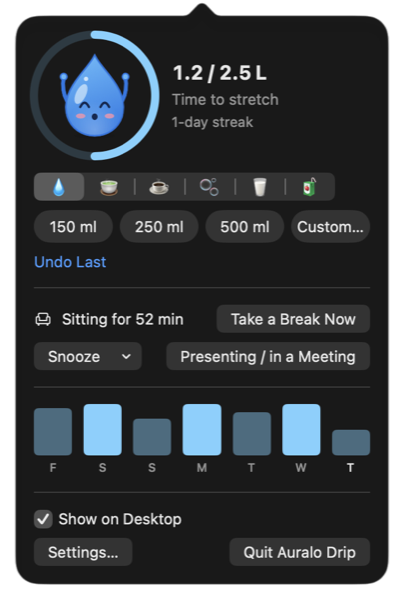
The menu bar window: Drip in a beanie, glasses and scarf inside a progress ring at 1.2 of 2.5 litres, a 1-day streak and today's caffeine, last week's recap, drink and glass buttons, and the sitting timer with Take a break and Breathe for a minute.
In your menu bar
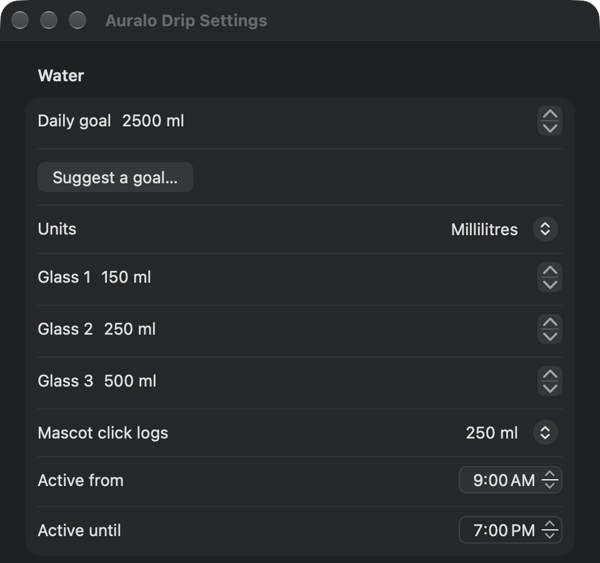
Settings: Learns your rhythm, Sync with Auralo on iPhone through iCloud, and Office buddy mode.
Settings
Water, tea, coffee
Log what you actually drink. Each drink counts by how hydrating it is, caffeine is tracked on the side, and the last seven days are a glance away.
Breaks worth taking
Twelve quick stretches that change every break, a minute of box breathing, and 20-20-20 rests for your eyes.
Out all day, or only when needed
Keep Drip on your desktop, or let it appear 30 seconds before a reminder and leave once you've logged. Pick its size, and how see-through it is.
Quiet in meetings
Reminders wait while you're away, and one click mutes them for an hour. On Mac, Drip can also wait out busy events in your calendar.
A week in review
A weekly recap you can share as an image, badges for good streaks, and outfits for Drip to wear. Export your log as CSV any time.
Office buddies
See who else runs Drip on your office network and poke them to drink up. Pokes are limited, and you can block anyone.
More on Mac
A widget with buttons, Siri and Shortcuts, and sync with Auralo on iPhone through iCloud.
No account, no tracking
Your log stays on your computer. On Mac, iCloud sync keeps an encrypted copy in your own iCloud; turn it off in Settings.

Questions

Is Drip free?

Yes. The download on this page is free.

Does it need special permissions?

No. To know you've been sitting, Drip reads how long it's been since you last used the keyboard or mouse, the same number macOS uses for the screen saver. It never sees what you type. Notifications are optional.

Will it slow my computer down?

No. While it waits, Drip uses well under 1% of the CPU; it only animates when something happens.

Where is my data?

On your computer. There's no account and no tracking. On Mac, iCloud sync (on unless you turn it off in Settings) keeps your drinks and breaks in your own iCloud, encrypted, so Auralo on your iPhone can see them. We never see your data. On Windows and Linux, nothing is uploaded.

Does it work with Auralo on iPhone?

Yes, on Mac. With iCloud sync on, your drinks and breaks show up in Auralo on iPhone, which can save them to Apple Health, and a reminder you deal with on one device clears on the other. Windows and Linux don't sync yet.

Which computers does it run on?

Macs with macOS 14 Sonoma or later (Apple silicon or Intel), Windows 10 and 11, and most Linux desktops. On Linux with Wayland, Drip can't follow your cursor with its eyes, because Wayland keeps the cursor private.
The Drip app icon

Get Drip

Mac: version 1.3.3, 3.3 MB. Needs macOS 14 Sonoma or later. Signed and notarized by Apple.

Windows

Windows 10 and 11.

Get it from Microsoft Store

Or download directly: installer · MSI for managed installs

Linux

Ubuntu, Debian, Fedora, Arch and most desktops, on Intel/AMD or ARM.

Ubuntu / Debian (.deb)

Fedora / openSUSE (.rpm) · Flatpak · Arch (PKGBUILD) · AppImage · .tar.gz

ARM64: .deb · .rpm · AppImage · .tar.gz

Every version keeps itself up to date: the Mac download and the direct Windows and Linux downloads install updates themselves (Linux packages through your package manager). The Microsoft Store version is signed by Microsoft and updates itself. The direct Windows installer isn't code-signed yet, so Windows may say it protected your PC: choose More info, then Run anyway. Checksums are on the release page.